RoleSchedule
Explore ProductView the complete product overview
Auto-Assign & RulesBuild coverage-aware schedules from eligibility, absences, and assignment rules.Role-Based SchedulingSchedule responsibilities and required roles instead of generic shift blocks.Eligibility & QualificationsControl who can fill specific roles before assignments are made.Scheduling Access ControlSeparate owner, admin, scheduler, and viewer access.Coverage ClaritySee open requirements and staffing gaps before publishing.
Explore Use CasesView the complete use cases overview
Team SchedulingSee how roles, locations, qualifications, preferences, and Auto-Assign work together.Security & Site OperationsPlan posts, patrols, qualifications, relief, and open coverage.Field & Service OperationsBuild qualified crews around technicians, inspectors, operators, and team leads.Continuous OperationsMaintain required capabilities across watch floors, control rooms, and multi-shift teams.Multi-Team OperationsCoordinate recurring coverage across several groups and shared responsibilities.
DemoPricing
Free Excel Duty RosterDownload a working weekly roster with open-slot and coverage tracking.Coverage Scheduling GuideLearn when headcount stops being enough to prove the operation is covered.Scheduler ChecklistCheck requirements, qualifications, absences, work limits, and publishing before the week is final.DocumentationConfiguration and workflow guidance for teams already using RoleSchedule.
LoginStart free
Product
Product OverviewAuto-Assign & RulesRole-Based SchedulingAccess ControlLive DemoPricing
Use Cases
All Use CasesTeam SchedulingSecurity & Site OperationsField & Service OperationsContinuous OperationsMulti-Team Operations
Resources
All ResourcesFree Excel Duty RosterCoverage Scheduling GuideScheduler ChecklistDocumentationContact
LoginStart free
Resources for the person building the schedule

Useful scheduling tools before you ever need another piece of software

Start with a template, pressure-test the rules behind your weekly plan, or learn where spreadsheet scheduling usually becomes difficult. These resources are designed to be useful even if you never create a RoleSchedule account.
Not sure where to start?

If you are building the next roster in Excel today, download the duty roster. If you already have a spreadsheet but spend most of your time cross-checking people and requirements, read the coverage guide.

Get the Excel roster →
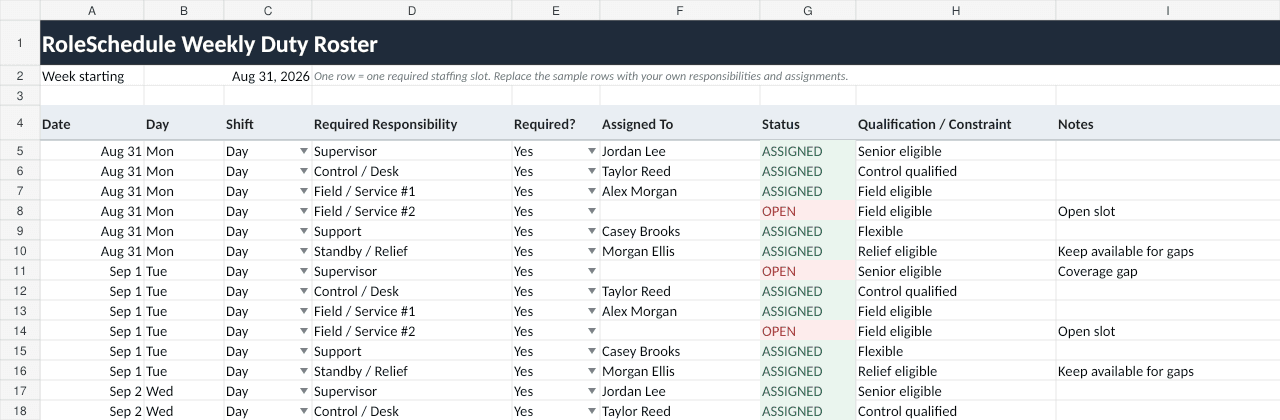
Preview of the free RoleSchedule Excel duty roster template showing required responsibilities, assignments, open slots, and notes
The free workbook includes a weekly roster, automatic coverage summary, and a qualification-reference sheet.
Free download

A duty roster that actually tells you what is still open

Use one row per required staffing slot, assign a person, and let the workbook flag what remains uncovered. It is a practical starting point for small teams and a useful way to make staffing assumptions visible before they turn into missed coverage.

Download Excel templateSee how it works
Choose the problem

Four resources, four different scheduling questions

01
DownloadFree Excel Duty Roster Template

Download a working weekly duty roster with open-slot status, daily coverage totals, and a simple qualification reference.

→
02
GuideCoverage-Based Scheduling Guide

Learn why enough people on a shift does not always mean every required responsibility is covered.

→
03
ChecklistWeekly Scheduling Requirements Checklist

A practical pre-build checklist for requirements, qualifications, absences, standby, work limits, and publishing.

→
04
GuideWhen to Move Beyond Spreadsheet Scheduling

Use a spreadsheet well, recognize where it starts breaking down, and decide when purpose-built scheduling software is justified.

→
When the template stops being the easy option

The spreadsheet is not usually the problem. The growing number of rules around it is.

If every assignment requires checking a qualification list, an absence tracker, work limits, team boundaries, and yesterday's version of the schedule, the manual process has become the system. That is the point RoleSchedule is designed for.

See the scheduling workflow →
RoleSchedule

Turn recurring staffing requirements into a schedule your team can actually follow.

Keep the roster, assignment rules, weekly planning, coverage review, and published schedule connected instead of rebuilding context across several files.

Product

Product overviewAuto-Assign & rulesRole-based schedulingAccess controlPricing

Use Cases

Team Scheduling Software for Role-Based CoverageScheduling Software for Security & Site OperationsScheduling Software for Field & Service OperationsScheduling Software for Continuous OperationsScheduling Software for Multi-Team Operations

Resources

Resource libraryFree Excel duty rosterCoverage scheduling guideScheduler checklistSpreadsheet scheduling guideDocumentationContact

Account

Start freeLogin
© 2026 RoleScheduleroleschedule.com